Tuesday, December 3, 2013

Choosing The Right Speakers For Your Computer

When buying a computer, many people don’t take much note of the type of speakers they will get for sound, video and gaming. They often rush ahead and go for a computer system what meets their specific budget at the time. However, many people find that the supplied speakers are not powerful enough to bring out the best in there sound, video and gaming. For this reason, buyers look for different types of speakers to bring out the best in audio sound.

There are many different types of speakers that you can purchase for your laptop or desktop system. In this article, we will discuss three different types and what they may be best suited for.

2.1 speakers – This speaker set normally comes as 2 speakers and a subwoofer to give that extra bit of bass. There are many speakers out there in this set and they can vary in price. Normally, the more you pay the better sound will be. However, this is not always the case. It’s a good idea to test speakers if possible or read many reviews on the Internet before you choose your speaker set. We personally paid around £100 for our 2.1 set and get excellent sound from them. These speakers may suit gamers and mp3 listeners.

5.1 speakers – These are speakers that come as 5 speakers with an extra subwoofer to give an impressive sound experience. Again, price can vary with these speakers. Look to pay around £120 for a decent 5.1 set, but you want to be paying over £200 if you want a real cinema experience. The sound from these sets of speakers can be very impressive when set up on your computer correctly for optimal sound performance. These sets of speakers may be suited for people who wish to have the ultimate multi media experience including gaming, dvd, codec video, mp3, audio, and multi media application including graphic animation.

2 speaker set – This is your stand alone speaker set that normally comes included with your desktop computer. Laptop buyers normally get speakers built in. It can be one or 2 speakers depending on the laptop. Many computer buyers are often not satisfied with the sound from their laptops so they choose to upgrade to a speaker set. These speakers can still sound very good depending on the make and the price you pay. These speakers are often suited towards people who download mp3, listen to audio, and use the computer for work, business or schooling.

Be sure to check out our site dedicated to computer speakers below this article. We feature reviews, guides and the latest news on computer speakers for helpful computer speaker advice.

10 Benefits Of Video Games


Gaming both video and computer has become more than a fad, it is a part of life. First generation video game players have now become adult and carry their passion to adulthood. Parents and teachers worry about games having negative effects on children and a great deal has been written about games leading to violent behavior and addiction. However, all is not negative about gaming, studies by leading researchers have shown that video and computer games have many benefits:

1. Games help children who are ill or have injuries. Absorption in a game distracts the mind from pain and discomfort. Many hospitals are encouraging children and others undergoing painful treatments to play games.

2. Griffiths a professor at Nottingham University wrote in a medical journal that playing games could help children with attention deficit disorders. Research indicates that the children could gain social skills.

3. Many medical departments are using computer games as a form of physiotherapy. Games help people who are recovery from physical injuries gain motor skills and coordination too.

4. Video games and computer games are known to improve hand-eye co-ordination and help players gain many skills.

5. Games induce decision making and tech players to think on their feet.

6. Games create team players and hone social skills too.

7. Games are known to enhance creativity and inculcate a taste for graphics, design and technology.

8. Many games improve language and math skills as players have to move at a great speed along with the heroes of the game.

9. Video and computer games help children gain self confidence and many games are based on history, city building, and governance and so on. Such games indirectly teach children about aspects of life on earth.

10. Games teach players problem solving, motivation, and cognitive skills. Most games inspire players to strive and reach more difficult levels presenting challenges at each stage.

Gaming video or computers has positive as well as negative effects. Anything in moderation is not a problem. Parents and children need to be able to decide how much gaming is permissible and what kind of gaming. Parents must teach their children what is good and what is bad. Gaming is like any other activity in life, too much hamburger or pizza can be harmful too.

The world of gaming is constantly changing. The internet is replete with articles and tips written by experts on gaming, benefits, and disadvantages, it is important to be informed parents and game players. Read up on games and learn how to choose games that are beneficial. Know what your child is doing at all times. Place your trust in your child but ensure that he or she is able to gauge accurately right from wrong.


Toshiba DR18DT (DR18DTKTB) � A Fantastic Addition to Any Home Entertainment System


Most home entertainment systems today comprise of a number of electronic gadgets that will include mainly the LCD TV as its focal paint, a set of speakers, a video source like a DVD player, digital video recorder, Blu-ray player, and even some video game consoles. And with all the new technology and designs being offered today, some may even opt for a unit that has combined the features of two or three units. For heavy users, there can be the combination DVD player with a digital video recorder using a hard disk for recording TV shows.

But for those who don’t have a need for a hard disk unit, maybe because they don’t really watch that much TV, or already has a personal video recorder, or you simply want a gadget that will be able to let you record DVDs for family and friends, then the Toshiba DR18DT may just be what you are looking for.

A scaled down version of the Toshiba RD-98DT without the hard disk capacity, the Toshiba DR18DT has support for two formats of rewritable DVDs. The first and most useful is the DVD-RW. This format supports video recording mode that allows editing afterwards of any recording. Also, there is support for video mode that, although takes out advanced editing later on, allows it to be more widely accepted by other DVD players. The next format is the DVD+RW that have more fundamental editing features. Both formats have write-once formats supported. Unfortunately though, the Toshiba DR18DT is not able to support DVDs with dual layer formats so you basically just get eight hours of maximum time for recording.

Design wise, the Toshiba DR18DT has been granted the standard all black finish that’s classically found in most of its products, with a silver strip dividing the unit into two. The design is sleek and sexy and looks great paired with a glossy black LCD TV. The Toshiba DR18DT is solidly built and is very slim. It won’t take up too much area if space is a consideration for you.

At the top half is where most of the distinct features of the Toshiba DR18DT is found. At almost the middle of the upper half is an LED display panel that shows much of the information relevant to its ongoing operation. The display can make use of a larger dimension as it is difficult to decipher from a fairly normal distance. A modest array of controls can be found on the silver strip with most options are designated to the remote control.

The Toshiba DR18DT comes already with a built-in Freeview tuner, so if your LCD doesn’t have this option, you are in luck, The unit even has full support for series and split recordings which are Freeview playback features. With this feature, you won’t need to set the timer each and every time to record your favourite TV show, it is done automatically and is even able to recognize if a show has been split into parts.

Overall, the Toshiba DR18DT is a very solid unit that offers a set of well-rounded features. It’s very affordable, easy to use, and does a superb job of not only decoding videos from DVDs, but also in encoding them.

Thursday, October 3, 2013

Better Sex Tips for Women


A good amount of pleasurable sexual act is undeniably one of the most important components which helps to build and maintain a successful and rewarding relationship. In most cases, good sex speaks louder than words when it comes down to love and intimacy between both partners.

Both partners are equally responsible for giving the others a total sexual pleasure. It is very easy sometimes for a woman to think it is her man's responsibility to give her sexual pleasure and to make her come. From time to time, certain women would also have the idea that they should not be too wild in bed, as this might give their partner a sense of insecurity! This is a total myth and one which should be addressed immediately if she ever hopes to have a totally satisfying relationship!

Women sure can be charming by the way they present themselves and also by the way they dress up. But, men like women who are also great in bed. Men like women who take the initiative and are confident in their sexual act. Men like women who give them complete pleasure and satisfaction at the end of the sexual act and they themselves should feel satisfied with their partners.

It is often said that only when women have 7 times the pleasure as men that women can reach an orgasm. This is totally wrong! The truth is, a woman can have no orgasm but that does not mean she is not satisfied with the sexual experience. At the same time, a woman may have multiple orgasms. The ultimate aim for a woman would be to satisfy her partner and herself.

A woman should devise new ways to excite her man in the beginning and get him involved completely in the sexual act. She can also gift herself or her man sex videos. This is certainly going to turn both of them on. Sex videos are a great resource to learn the finer and more beautiful nuances of sex. Videos also help you learn different better sex positions so that sex does not become a monotonous act.

A better sex tips for women would be to get stimulated in the beginning. Performing sex just for the sake of doing it won't bring in any enthusiasm and pleasure. The most important part is to be you throughout the whole sexual act.

Women should be as flexible as possible in the whole sexual experience. Try out different things to excite your partner. Like, tying a handkerchief around his eyes and then slowly running your fingers on his body or, you can write erotic stories and then narrate them to your partner in order to stimulate him and respond to your demands.

Communication, both verbal and sexual is another important aspect which help to improve your love life. Tell your partner how comfortable you feel in his arms and thank him for the great sexual experience. Tell him that you would like to take the fantastic journey as much as you can. This is sure going to build a stronger sexual bond between you and your partner.

You can also create an environment to excite your partner like lighting candles in the room, keeping the room dark, playing soft love songs which you both enjoy and so on.

At the end of the day, it is a matter of communication, both verbal and sexual, that is going to make your relationship works. Be selfless and live for the moment for each other.

Tuesday, September 3, 2013

Who needs T.V. News, Newspapers and Radio News?

T.V. and radio News got you down? On-line current events and News blogs make being informed a much more enjoyable experience. For many the News on television has become a trying time of the day. Focused mainly on negative events, you may have to wait through the whole program just to hear the one story you were waiting for. If you miss the 6:00 p.m. show, waiting until the late night segment can be a real drag, especially if you’ve got a lot to do, or have to wake up early the next morning.

My friends, there is an answer to this problem: News blogs or on-line current events. You can find all of your favorite broadcasters (E.g.: CNN, BBC) on the Internet, getting up-to-date information at any time of the day or night. You can even read personal journal entries written by multiple correspondents out in the field reporting on several different stories down to the current minute. Instead of hearing all News from one voice (often an irritating one), now you can read different human opinions straight from the scene of interest.

Often News on-line has a section called “themes” which allows the reader to only hear about the specific areas that interest them. No more waiting through several wars to get to the positive story about the current medical breakthrough that could mean a cure for disease, or the technological idea that might mean the end to extreme pollution levels. Like a newspaper, you can go straight to the “jobs” theme and search through all the current employment vacancies available. If you are obsessed with the negative, themes such as “Disaster and Tragedy” and “Crime and Punishment are still readily accessible.

As the News is now on the Internet it has also become an interactive experience in numerous ways. First of all now you can send News stories straight to the News companies yourself! If the story is deemed worthwhile and verifiable, you may even be published. This is also the case with photographers who have pictures of important events. It really means anyone can become a part of the action as a freelance consultant. Some News on-line have “witness” sections where you can tell your story if you happen to have been in the right place at the right time. This option means that we can hear many different views on contentious issues giving a wider perspective to the ‘big picture’.

Some News sites also have interactive sites within. For example, on the BBC News Blog there is a learning site (BBCi Learning) that involves interactive activities and over half a million pages of factual information and resources available for children, adolescents, and adults. There are competitions and all sorts of games to help educate people in any and every area of interest imaginable.

Another great aspect of these on-line News sites is the ability to access archival information. You can watch video and listen to audio recordings of famous historical stories right on the computer. If the day is Feb.3, you can read articles from Feb.3’s from fifty years ago. Looking up any date and year recorded is as easy as pushing a few buttons.

Some services have subscriptions where instead of looking up the website, the News you want is sent straight to your email. Being in the know, and being in the now, has never been such an objective, enjoyable, and simplistic experience as in the 21st century. Partaking in a new perspective on life is what on-line current events and News Blogs are all about.

Saturday, August 3, 2013

10 Ways You Can Use Your HOTSHOTS MiniMaxx LED Data Projector

The HOTSHOTS MiniMaxx LED Data Projector provides the flexibility and portability you need to professionally project your presentations, spreadsheets or videos with brilliant display, everywhere you go.


Regardless of your location, HOTSHOTS MiniMaxx Projectors allow you to project still or video images from your portable devices to any flat surface.


These lightweight, pocket size LED projectors give you the ability to quickly and easily display images from your laptop/PC, camera, mobile phone, iPod and other portable devices. This Mini Projector is perfect for all occasions, from professionally projecting your presentation to a group of colleagues; to sharing those special photos with family and friends or enhancing home entertainment from within your lounge room.


So, what can these Mini Projectors can be used for?


1. Professional Presenting

From laptops, desktops, DVD players, iPods, iPhones, or any device that will output to a standard projector or monitor.


2. Advertising "On-the-Fly"

Demonstrate your product portfolio on any available wall in supermarkets, shopping malls, retail stores, wherever you like with minimal footprint.


3. Video Viewing or Editing

Size counts especially when you are editing your videos. Give them the HOTSHOTS treatment and turn your living room wall into the cutting room floor.


4. Photography

No more crowding around the camera or laptop to squint at your photos. Project your Project!


5. Sports Clubs

MiniMaxx are great for clubhouse coaching sessions or "Video & Slide Nights".


6. Artists

Project pictures onto canvas, draw outlines and create masterpieces.


7. Home

Extra TV(s) at half the cost. Project to 96cm (37") at 1.5m distance, up to 200 cm (80") at 3m distance (approx.). Project from most current devices including Video/DVD players; Digital & Video Cameras; Most Game Consoles like Play Station, X-Box, Wii; PSPs; Laptops; Desktops; iPhones; SmartPhones; iPods; Digital Media Players etc.


8. Holidays

Take it with you when you go on your holidays, another distraction for the kids and stop the fighting over who gets to watch or play what.


9. Caravans & Mobile Homes

No need to crowd around the mini-portable TV any more when you can project onto your own screen, wall, bed sheet or annexe wall.


10. Home Videos

Watch them in whichever room you choose, even as you make them!


The MiniMaxx Data Projector has 4GB on-board memory, Micro SD expansion slot and remote control. With 35 Lumens of Output GRUNT, you get Maxximum performance with Minimal luggage.


With the HOTSHOTS MiniMaxx can you store your presentations on your projector or your SD cards and change them at random without having to carry any other output device.


So all you need to do is WALK IN, TURN ON, SHOW & TELL, IT'S THAT SIMPLE.


Barry Shuttleworth begin_of_the_skype_highlighting     end_of_the_skype_highlighting founder of HOTS (Hospitality Outside The Square) brings over 20 years of practical hospitality experience with the latest in technology to provide innovative, profitable and successful solutions for your business.


To find out more about how the Mini Data Projectors as well as other related products can provide the solution for your projection requirements, www.miniprojector.com.au


Wednesday, July 3, 2013

Tips For Successful Learning As an Adult Student


Regardless of what reasons, adult learners who re-enter a college to further their study need to prepare themselves to go through their learning path successfully. However, the older the student and the longer delayed of college experience may cause an adult student to have a problem to re-adapt the learning environment; this explains why many of them tend to leave their study half-way without completing what they have started. So, if you have decided to go back to college for a degree, don't become one of the drop-out adult students. Here are a few tips that you can use as references to complete your study successfully.

1. Organize a comfort study environment

For academic success, a comfortable study environment is important. Your study space at home doesn't have to be large, but it needs to be a comfortable and quiet space where you can focus on your study. Your learning environment at home should include the necessary school supplies such as notebooks, pens, file folders, binders, etc. Internet that is full of information and knowledge will help in your study; so, install a computer with good broadband connection is a necessary for a successful adult student.

2. Plan your study with a realistic study schedule

Adult students many have more obligations to be carried out such as family, work, chores, etc. Finding sufficient time to study may be a challenge, but with a proper time management, you can still manage it. In order to manage your time properly, you have to plan and fix a schedule for all tasks including your study. The schedule should be realistic and allocates enough time for you to do your homework, assignments and revision on what you have learned at school. Study schedule is an important habit for an effective adult student. Students with a realistic study schedule are more likely to be successful than those without it.

3. Maximize your time

With other obligations, you as an adult student will have less study time than those young students who can spend full-time on study. So, you have to learn how to maximize your time. There are some times here and there which you use to maximize your study. For example, you can read course material on the commute, during the lunch break at work, while waiting for a meeting to start, or in other spare minutes. Since these pockets of times are short-spare time in between tasks, your reading materials should be in handy format. You may also convert these reading materials to audio formats, which you can hear them on the drive.

4. Learn to say no

Once you have decided to go back to school as an adult student, you have to commit to yourself to get through it successfully. Time is a constraint for an adult student who has many other obligations, so you may need to say no to volunteer requests, favours for friends, and other extra works that are optional. You should always prioritize on your study and don't let your pre-fixed schedule interrupted by unplanned stuffs.

Summary

The above 4 tips are habits mastered by successfully adult students. You can be one of them if you follow these successful tips to get through your study and get graduated. Good luck and happy learning!

You can find additional info at the following links:

Click Here for more information

How to remove commercials or edit out unwanted scenes from a video

This article considers the simple scenario:You want to clear the movie from commercials or unwanted scenes.

This article explains how to do that with MPEG video Wizard DVD in a few simple steps without video/audio quality degradation and in a couple of minutes.

There are three ways to edit out commercials.

Method A:

1. Open the video in the Input Monitor.

2. Right click in the input monitor and select "Book Mark Browser"(or Press F3 ).

3. Press the "BlankFades" button in the Bookmarks window.

4. Drag and drop all clips in the bookmarks window onto timeline.

5. Double click each clip to play it in the input monitor, then "shifted+delete" the commercial clips.

6. Click the red button on the Timeline to export all the remaining clips to a new file.


Method B:

1. Open the MPEG file in the Input Monitor.

2. Drag the navigation bar to find the commercial beginning, and click 'Mark in' button to mark the beginning. You can use arrow keys to find exact spot

3. Drag the navigation bar to find the commercial end, and click 'Mark out' button to mark the end.

4. Press the Trim cut button (or the 'X' key) to remove the selected segment between 'Mark in' and 'Mark out'.

5. Repeat the steps above for all the commercials of a show.

6. Press the 'G' key to add the remaining segments to the Timeline, and preview the video in the Output window.

7. Click the red button in the Timeline to export this video.


Method C:

1. Load the file onto the timeline

2. Drag the edit line to the start of first commercial break - can zoom in and/or use mose wheel / arrow keys to find exact spot

3. Press CRTL+Q to split

4. Locate the end of the commercial break in the same way

5. Split

6. Right click on the commercials - now a separate clip - and choose "shifted delete"

7. Repeat for all commercial breaks

8. Export

Click http://www.womble.com/dvd/download.php to download this tool.

Monday, June 3, 2013

Wedding Videography in the Digital Age

What's the state of the wedding videography industry today? To find out, we talked with working wedding videographers, found industry statistics and fleshed out what is undoubtedly a flourishing business in a growing market. Although some might wonder if amateurs are moving in on the pros because of lower-cost gear and easier-to-use software, our consensus of wedding shooters and editors say that isn't so. We also took a look at the tools wedding videographers are using, and found out how the best wedding videographers are using the Web to open up new avenues of business for their bustling enterprises.

To get an idea of the size of the wedding videography market, first let's take a look at statistics that reveal the enormous amount of money spent on weddings in the United States. According to the American Wedding Study by Conde Nast's Bridal Infobank, in the last ten years spending on an average wedding has exploded by 50%, to an average of $22,360 per wedding this year, up from $15,208 in 1994. And, according to Richard Markel, President of the Association for Wedding Professionals International, of the $65 billion spent on weddings each year, "6% of the budget would be for video." Markel added, "But using the 6% of the estimated $65 billion spent will equate out to $390 million." This signals a wide-open market for wedding videography professionals. Markel continued, "We just had a show here in Sacramento and several of our videographers booked business with an average ticket price of $2,500."

Advertisement

Looking at those stats, wedding videography appears to be a growth industry. Let's do the math for a moment. Consider an experienced videographer , charging $2500 for an average wedding, shooting one wedding per week. In a year, that person has earned $130,000. But that would be a very hard-working videographer -- most of the videographers we talked to said they spent up to 40 hours editing each wedding video, meaning a weekly shoot would constitute nearly-constant travail with hardly any time off.

One great success story would be that of high-end videographer Kris Malandruccolo, whose company Elegant Videos by Kris has been operating in the Chicago area for the past 16 years. Her business can command as much as $5000 for a wedding video package, and regularly signs contracts for $3000 weddings. But the mother of three doesn't want to work all the time, so she limits herself. "Someone else could shoot four or five per month. But I average two or three weddings a month," she told Digital Media Net.

According to Luisa Winters, an award-winning videographer and editor who has her own wedding videography business, Unforgettable Events, most wedding videographers charge under $2000 for their services -- with higher-end wedding video companies charging as much as $15,000-$20,000. "I do not consider anyone a true professional unless they are able to make enough money to support themselves with this business," Winters told Digital Media Net. "Anything else is a side business. Supporting a family means different things depending on what part of the country you are located. If you are in a less expensive location, then less income will suffice -- and you are still professional," Winters added.

At prices of $2000-$5000 and up, it seems like amateurs would be interested in shooting their own wedding videos, or getting a friend or relative to take the controls of the family camcorder . But Internet message boards for wedding videographers are rife with stories of first-time videographers shooting an entire wedding ceremony with the camcorder on pause, only to find they began rolling after all was said and done, ending up with lots of artistic shots of the floor and nothing else. According to videographer /editor Luisa Winters, "The amateurs are taking a bite out of the wedding videographer business, but that is true only for the lower-end videographers." She thinks the lower-end shooters make things better for the higher end, increasing the quality gap between the two. "More-educated brides will expect to pay a lot more for a video that looks professional than they were willing to pay before the advent of such inexpensive equipment. The difference between an amateur wedding video and a professional one is huge, and people are willing to pay Top Dollar for the latter." Sometimes quality considerations can be quite basic, such as, can you hear what the bride and groom are saying? "You really have to worry about the audio part of it, you know. There's a lot involved," said Kris Malandruccolo, who in addition to being a successful wedding videographer is president of the Illinois Videographers Association.

Is the playing field being leveled by the profusion of low-cost, high quality equipment? According to Winters, "The quality of image and editing capabilities has become less important to the fact that now you have to be a better storyteller, you have to be a better artist... after all, we all have access to pen and paper, but we cannot all write the great American novel, right? Shakespeare and Mozart only had pen and paper to work with, and yet they gave us masterpieces that transcend time. Not all is determined by equipment."

Then there's the editing, which is a process many newlyweds aren't equipped to handle. "As you know, anyone in the business who edits knows it's a time-consuming process," said Malandruccolo. "I take tons of family videos but none of my personal stuff is edited, because there's no time. So if I wasn't getting paid, then I would not be editing, because it's so time-consuming, especially if you don't do it all the time. I think a lot of people, especially if they have the money, just want to say 'do it for me.'" Malandruccolo added that it's not just the time element that is a barrier to entry, but it's the professionalism required to create a polished production. "The end result is that you have a better quality video. Like I emphasize to my clients, this is a family heirloom. You only get one shot to do it right, and you can't do it over, so being that this is a family heirloom, if you look at it that way, then they're willing to invest the money into it. And I've never had a client say that they're sorry that they spent the money on video. Clients just don't say that," added Malandruccolo.

Wedding videography has changed significantly over the past 20 years, where digital video shooting and editing has brought highly sophisticated techniques to a type of video production that was once quite basic. In those days it was typical to spend about $1000 on a video that was a simple, point-and-shoot production, with all the editing taking place in the camera . But now, with the power of digital technology, videographers are taking advantage of 3-chip DV camcorders and sophisticated editing setups, resulting in extraordinary productions, many of which are true works of art.

For the shooting tasks, most wedding videographers use DV camcorders in the league of the Sony PD150 or VX 2000, Canon XL1 and GL2, or Panasonic 3-chip camcorders such as the AG-DVX100. Said Winters, "Most wedding videographers will use DV for acquisition (3-CCD), which is logical, because the cost is low, the quality is high, and above all, the weight of the camcorder is so low now, that videographers are able to be more creative with the smaller units than they were able to be, say, five or six years ago, when the cameras where huge. No longer do you have to have a big professional-looking camcorder to get good money videotaping weddings. In fact, many clients prefer the smaller units over the bigger ones, because they are less obtrusive."

Another staple of wedding coverage are wireless microphones, usually attached to the groom and strategically placed elsewhere, assuring that the most important words many people will ever speak will be clearly heard on the final product.

The biggest technological leap has been in editing, where even unsophisticated computers can create presentations that would have been possible only in a multi-million dollar edit suite 20 years ago. Apple Final Cut Pro is the most popular Mac application for editing, with Adobe Premiere Pro 1.5 leading the pack on the Windows side. Other wedding videographers use Sony Vegas, Pinnacle Liquid Edition , Avid Xpress , NewTek Video Toaster, Canopus Edius and others. Some videographers opt for real-time DV acceleration cards such as the RT.X100 from Matrox or the DVStorm2 from Canopus . One constant is obvious throughout the equipment decision arena -- people are staunchly devoted to the choices they've made. Winters said, "They're loyal, from fierce arguments about the superiority of an operating system or capture card to the inferiority of the competing product. My personal opinion is less partisan. To me an editing system is a tool and nothing more -- whatever works and makes me money is what I will use -- and in this case I have chosen Premiere Pro 1.5 and a Matrox RT.X100 capture card. I have both the real time card from Matrox and plain generic FireWire cards."

Another popular technique of today's wedding videography is multicamera production. At its most rudimentary level, a videographer will operate one camcorder while a second unmanned camcorder is set up on a tripod, taping the event from a different angle. For the reception, most of the time a single camcorder does all the shooting, with the other used as a backup. At its most sophisticated, a multicamera setup works in much the same way a network remote production would be configured, with multiple cameras attached to a switcher located in a separate room outside the venue. A director is in constant contact with each of the three, four or more camera operators via headsets, coordinating their shots while switching live between cameras while rolling tape in each camera for isolated footage that can be added in post.

Advanced technology also makes the final product delivered to clients much better, where a high quality DVD is now commonly handed to the client when all the shooting and editing is done. Formerly an extra-cost option for wedding video clients, DVDs have been working their way into the mainstream particularly over the past few years. Said Malandruccolo, "When I first started offering DVDs about three years ago, they were expensive. I had it as an add-on. Not everyone took it because not everyone had a DVD player. It's amazing how quickly that has changed, because now a lot of couples aren't even interested in a VHS copy except for Grandma." It's not surprising that DVDs have taken over as far as deliverables are concerned. With home DVD player prices now dipping below $50, and many computers including DVD burners and players as standard equipment, DVDs have become a ubiquitous delivery medium for videographers of all kinds. Perhaps the greatest benefit of this is the fact that finally clients can see the true quality of the video, virtually the same as the quality of the camcorder on which it was shot. That represents quite a quality difference from the VHS tapes that were the norm just a few short years ago. "So many times, I was shooting with a 3-chip camcorder , and I would have this beautiful miniDV master, but then the couple's walking out the door with VHS and I'm putting the master tape in a box in my studio. All that quality would go to waste," said Malandruccolo.

Every wedding videographer is intensely concerned with marketing, and high technology has been a boon to all involved. The biggest plus is the Web, with its ability to bring a tremendous volume of information to anyone with a computer. By far the most important innovation for wedding videography marketing is streaming video. Some reported to us that clients will not consider a videographer unless they can see a streaming video demo of the shooter's work on the Web. Where in years past a client would need to personally visit numerous videographers to see examples of their work, now a bride-to-be can visit twenty Web sites in an evening, picking a videographer whose style and pricing matches her taste and budget. Streaming video is also important after the wedding is shot as well. According to Richard Markel, President of the Association for Wedding Professionals International, streaming video lets clients show their wedding to the world. "The ability to email or add streaming video to a Web site is awesome -- now viewers that could not attend the wedding from around the world -- friends and family -- can view the wedding wherever they are," Markel said.

The Web has become so important on wedding marketing, that some videographers report a full 50% of their business is attracted via the Web. Clients can see the demo videos, get a price quote, and negotiate the entire shoot without ever seeing the videographer . "A lot of brides complement my Web site," said Malandruccolo, because they get the instant gratification of seeing samples immediately. "The majority have broadband connections so they can see the sample videos of past projects. I've booked brides without even meeting with them, just from them finding my Web site, clicking on the streaming video, calling me, talking price, and they'll say, 'All right. Send me a contract.' I feel if you're a videographer , if you want to get more business, you need to offer streaming video."

However, the Web isn't the only way to drum up business. As it has always been, another important tool is referrals, that age-old kind of word-of-mouth advertising where happy customers report their positive (or negative) wedding video results to others looking for the same service. Videographers such as Luisa Winters of Unforgettable Events see the Web as more of a reinforcement tool for referrals than an end-all. "The Web is great, but it is just a means of reinforcing what they have heard already through the referral, or if they are just surfing the net," she said. According to Winters, "By far, most clientele comes to us resulting from referrals from brides and other vendors -- in fact, we do not advertise at all." Surprisingly, she sees other wedding vendors as her allies, even if they are competing wedding videographers. "Many times my referrals come from other videographers that just cannot do the job for whatever reason -- mostly because they are already busy. Referrals, referrals, referrals -- that's the way to go!"

Attending a bridal show is another way for videographers to get the word out about their services. Brides-to-be attend these shows to see new trends and pick up ideas, and the number of videographers showing their wares at such events has increased over the years. According to Markel, "I have had videographers in my consumer bridal show over the last 15 years, however it was only one or two at most per show. But that's changing fast -- last week at our show we had 11." There are also exhibitions that are held specifically for wedding videographers, the biggest being the annual event held by WEVA, the Wedding and Event Videographers Association.

Another powerful way to attract attention to a videography business is by advertising in bridal publications. That's why Illinois Videographers Association president Kris Malandruccolo says it's a big advantage to be a part of an organization where videographers can band together. "We took out a co-op ad in Chicago Wedding Pages magazine and Wedding Guide Chicago, and in order to be on that co-op ad, you have to be a member of IVA. So we're able to advertise in magazines for less cost, because we're all going in on the ads." But even though Luisa Winters thinks ads are important, she adds that there's more to it than that. "He or she who markets best, wins," asserted Winters. "And notice that marketing is not only placing ads, it is building those relationships in the wedding business which will lead to referrals -- that is the marketing that counts the most."

All the wedding videographers interviewed were certain that amateurs are not overrunning their businesses in any significant way, although there were numerous examples of "newbies" who made valiant attempts but found out -- often too late -- that pro-level videography isn't as easy as it looks. Even though equipment prices and easy-to-use editing software has brought video-making into the mainstream, talent and experience, as well as hard work and shrewd marketing are still scarce qualities that make professional wedding videographers a valuable resource to the multi-billion dollar wedding industry.

How to fix DVD/CD-ROM drives (Code 39 error) in Windows XP or Vista

DVD/CD-ROM drives (Code 39 error)
At present, the player's devices are CD-ROM, DVD-ROM. The faults are caused by hardware and software kinds. Considering the mechanical is too difficult to the inexperienced, so we here just focus on software dealing with drives' error (Code 39 error).

After loading the Windows, the DVD/CD-ROM drives work properly, but we can not see the drives in "My Computer" (System can not recognize the drives.). When try to run the drives, it shows up a notice "Windows cannot load the device driver for this hardware. The driver may be corrupted or missing. (Code39)." Before solving this error, check the drives connection correctly, then follow the steps below:
Delete Device Manager. Most people will firstly think of Windows "Find New Hardware" when drives missed, but it does not always work out. To fix the problem: open "My Computer"→ "Control Panel" →"System"→"Device Manager"→ "HDC(Hard Disk Controller) ", then click "Delete". Follow the note to reboot computer. After rebooting, the computer will find the Primary IDE Controller and Secondary IDE Controller again and install the drivers. Restart the computer again while the installation is completed. In this, we can get back our CD/DVD-ROM Drives.

The other way is by editing the registry to return the missed CD/DVD-ROM drives (Code 39 error.). Obviously, it is too risky to edit the registry if you are not familiar with it. To fix the error from the registry, carry out the following steps:
Exit and close all applications currently running on your PC.
Step1. Click Start > Run and type in Regedit, press Enter.
Step2. Look for the following registry key:
HKEY_LOCAL_MACHINESYSTEMCurrentControlSetControlClass {4D36E965-E325-11CE-BFC1-08002BE10318}
Delete any of the following registry entries under this key directory:
LowerFilters
LowerFilters.bak
UpperFilters
UpperFilters.bak
Step3. Reboot your PC and open My Computer to check that the CD-ROM drive is visible.
Also, have a look at the Device Manager to see if the yellow exclamation mark and the error code 39 are gone.

System errors are not welcome guests that bring up unhappy computing experience. Registry Easy (www.registryeasy.com) is a professional troubleshooting system maintenance tool that can help you to solve this error and many more.

You can find additional info at the following links:

Click Here for more information

Friday, May 3, 2013

Cupcake Wars - Food Network - Starry Night - (Official Video)


The Food Network is holding a contest for the worlds best cupcakes. This is the official video submission by the Starry Night Bakery in Westminster Maryland. Please take a moment and check out our video submission on You Tube.

Be it the perfect Cappuccino or Smoothie, delectable pecan sticky bun, or a cozy couch with incredible lighting Starry Night Bakery and Coffeehouse is the highest plateau. All baked goods and drinks are prepared on premises fresh several times a day!

A standard cupcake uses the same basic ingredients as standard-sized cakes: butter, sugar, eggs, and flour. Nearly any recipe that is suitable for a layer cake can be used to bake cupcakes. Because their small size is more efficient for heat conduction, cupcakes bake much faster than layer cakes.

Individual cups, or cupcake liners, may be used in baking. These are typically round sheets of thin paper pressed into a round, fluted cup shape. Liners can facilitate the easy removal of the cupcake from the tin after baking, keep the cupcake moister, and reduce the effort needed to clean the pan. The use of liners is also considered a more sanitary option when cupcakes are being passed from hand to hand. Like cupcake pans, several sizes of paper liners are available, from miniature to jumbo.

In addition to paper, cupcake liners may be made from very thin aluminum foil or, in a non-disposable version, silicone rubber. Because they can stand up on their own, foil and silicone liners can also be used on a flat baking sheet, which makes them popular among people who do not have a specialized muffin tin. Some of the largest paper liners are not fluted and are made out of thicker paper, often rolled at the top edge for additional strength, so that they can also stand independently for baking without a cupcake tin.

Starry Night Bakery and Coffeehouse are toddler and newborn to owner Shannon E. Clarke. With a background in graphic design, a love of "unconventional" ways, and an unstoppable attitude Shannon created and brought life to the Starry Night Bakery several years ago. In the fall of 2005, the Starry Night bakery was launched into not only a coffeehouse, but also a "desserterie". A welcoming place to relax, indulge and be pampered thrrough great espresso and fine plated desserts. This is definitely a haven catering to an older, not so teething crowd.

Daily specials on Coffee, Smoothies and plated desserts as well as our new "Coffee'Holics" retail gift shop are sure to draw a crowd. Starry Night Bakery will be keeping more whole cakes readily available for last minute gatherings, and as always orders are suggested for your planned events.

From cupcakes to gift baskets, from plated desserts to java jewels Starry Night Bakery & Coffeehouse will have you indulged!

So when you want to pamper your Higher Senses,come see us and unwind. Make sure to stop in, relax and take advantage of our free high speed internet access while you relax with a cup of coffee and dessert.

Sunday, April 7, 2013

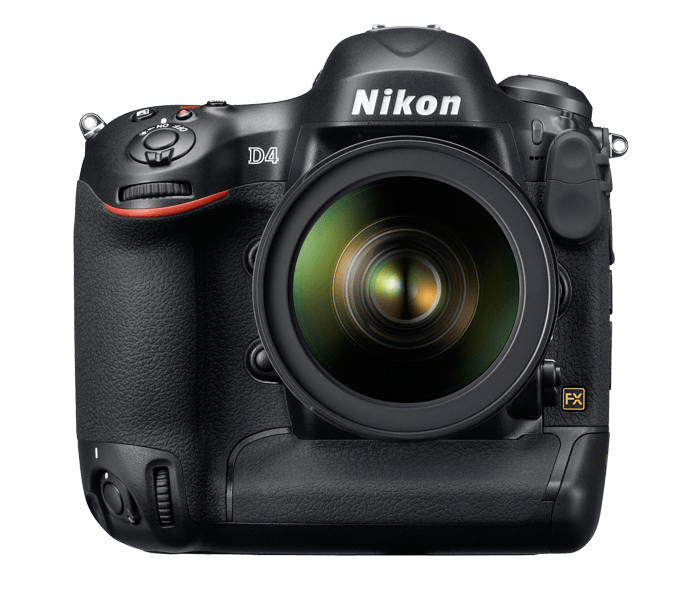
Why Nikon D4 Release Video

For those of you who are really into photography and videography you will enjoy this release video.
All the footage is shot using the Nikon D4 which shows crisp settings with colourful compositions.
The transitions and slow motions are pretty amazing for a DSLR camera.

Who doesn’t dream to own a camera like this?

At 16.2 megapixels, this high-end professional model improves on the speed and accuracy of its predecessors by boosting image quality and low-light capability, adding full HD 1080p video recording to the mix, and offering a multitude of new features.

 Success has a new name


Enter the new flagship of Nikon’s D-SLR lineup: D4. Engineered for professionals, D4 strikes an ideal balance between resolution, sensor size, image processing and ISO range. Its newly designed FX-format sensor and EXPEED3 processor enable image capture up to 10 fps with full AE/AF performance and Full 1080p HD video. Combine that with cutting-edge metering and AF systems, intelligently designed controls, an ultra-rugged body and multiple connectivity options, and D4 liberates the world’s top-notch photographers and multimedia artists like never before.


Wednesday, April 3, 2013

Technology in the Workplace: The Benefits of Video Conferencing

Technology in the Workplace: The Benefits of video Conferencing Copyright 2005 Octocat Ltd

What once required the physical presence of a number of individuals in a common location is now being accomplished through video conferencing. Thanks to the technological leaps of the past several years, any number of people can attend the same meeting from all points around the globe at any given time.

The ability to engage in video conferencing offers a multitude of benefits and, today, is widely utilized among most large companies, as well as a number of smaller firms.

One of the many benefits that can be realized when integrating the use of video conference technology into the workplace is an increase of productivity. Taking no more time or effort than a simple telephone call or walk to the office next door, video conferencing allows individuals to attend meetings from their own location, freeing up their time to continue doing business without the loss of travel time. As a result, hundreds of hours can be saved over the course of a year, which adds up to a significant amount of time that can be utilized for the purposes of performing other critical tasks.

Video conferencing also offers the benefit of economic savings. Those same individuals who, in an earlier time,
would have had to travel – sometimes, extensively – in order to attend certain meetings and conferences, can now participate from their own offices, saving substantial amounts of money. If the conferences were scheduled to last for more than one day, hotel expenses also needed to be factored into the budget, as well as airfare for those who were traveling from a distance. When you add up the savings over the course of a single year, your company can save tens of thousands of dollars or more.

Due to the concerns surrounding travel – particularly air travel – in our society today, a video conference is ideal for ensuring the safety of the participants. Though there are always risk involved with travel of any kind, those that plague contemporary society puts the safety factor very high on the priority list.

Currently, even the bravest hearts are apprehensive regarding this issue, and most would not consider this to
be a risk that they would be willing to take for their job. Video conferencing offers the opportunity to avoid having to make this type of decision, while ensuring the safety of all concerned.

Customer relations may also be improved through the use of video conferencing. This is a great way to stay in touch with significant clients or those who are viewed as potential clients, without the need to make a physical visit or take up too much of the client's time. Since the most effective meetings are those which can be attended in a face-to-face environment, video conferencing provides the ability to meet that goal while avoiding the inconvenience of travel, time and expense.

If you're not currently tapping into the benefits of the video conference forum, it's in your best interests to do a
bit of research into the possibilities of utilizing this form of personalized communication in the future.

With the wide variety of benefits that it offers, and virtually no drawbacks, there's no reason to put it off any longer. By saving productivity, money and time, your company will be that much closer to achieving and maintaining a successful and productive year.


----------------------------------------------------
Mike Spencer provides helpful reviews of new technology and exciting business services to help small and home office businesses make the most of online communication tools. Discover how video conferencing could dramatically cut your business expenses and increase profits at Mikes site here: http://www.video-conference-reviews.com


Video Source: Youtube

EDI: Electronic Document Interchange for Microsoft Great Plains � overview for Software Developer/Programmer/DBA

Microsoft Great Plains - Microsoft Business Solutions accounting and ERP system, originally targeted to mid-size - now, with advancements and increasing reliability of its database - Microsoft SQL Server, Great Plains is attractive solution for large corporation. Big companies usually have purchasing and order processing automation via so-called Electronic Document Interchange or EDI. EDI was introduced long time ago for UNIX systems and in most of the cases appears in the form of Header, Lines and Trailer of predefined fixed position fields.

We would like to give you - programmer, software developer, database administrator the primary clues on producing EDI formatted text from Microsoft Great Plains database. Please, note however that Great Plains here is taken as the example, similar approach will work for other SQL based systems: Navision (SQL Database or C/SIDE database), Microsoft RMS, Solomon as well as Oracle and other non-Microsoft products. In the case of non-SQL system, such as old Great Plains Dynamics, ACCPAC on Pervasive SQL - IDE interface will involve ADO/ODBC or Microsoft Access programming.

1. Sample Query – The query below uses CAST construction to make the result fixed length and meet the positioning. Plus the unionizing allows to produce Header and Detail in one select statement. Here we are dealing with work Sales Documents

  select  case  when b.LNITMSEQ=c.LNITMSEQ+1 and b.CMPNTSEQ=c.CMPNTSEQ+1 then CAST('Header' as char(10))  else CAST('Detail' as char(10))  end  as FIELD0,    case  when b.LNITMSEQ=c.LNITMSEQ+1 and b.CMPNTSEQ=c.CMPNTSEQ+1 then cast(a.CUSTNAME as char(65))  else cast(cast(b.QTYDMGED as decimal(19,5)) as char(65))  end  as FIELD01,    case  when b.LNITMSEQ=c.LNITMSEQ+1 and b.CMPNTSEQ=c.CMPNTSEQ+1 then CONVERT(char(51), a.DOCDATE, 101)  else cast(b.ITEMDESC as char(51))  end  as FIELD03    --Additional fields go here  from SOP10100 a join SOP10200 b on a.SOPTYPE=b.SOPTYPE and a.SOPNUMBE=b.SOPNUMBE join  RM00101 d on a.CUSTNMBR=d.CUSTNMBR   join  (select SOPTYPE as SOPTYPE, SOPNUMBE as SOPNUMBE,   LNITMSEQ   as LNITMSEQ,   CMPNTSEQ  as CMPNTSEQ from SOP10200  union  select SOPTYPE as SOPTYPE, SOPNUMBE as SOPNUMBE, MIN(LNITMSEQ)-1 as LNITMSEQ, MIN(CMPNTSEQ)-1 as CMPNTSEQ from SOP10200  group by SOPTYPE, SOPNUMBE  ) c on a.SOPTYPE=c.SOPTYPE and a.SOPNUMBE=c.SOPNUMBE  and ((b.LNITMSEQ=c.LNITMSEQ and b.CMPNTSEQ=c.CMPNTSEQ) or (b.LNITMSEQ=c.LNITMSEQ+1 and b.CMPNTSEQ=c.CMPNTSEQ+1))  left join SOP10106 udf on a.SOPTYPE=udf.SOPTYPE and a.SOPNUMBE=udf.SOPNUMBE  where a.ADDRESS3'Exported' and   a.SOPTYPE=3 and upper(d.USERDEF2)='YES'  order by a.SOPTYPE, a.SOPNUMBE, b.LNITMSEQ asc  

2. Mark processed documents - for this reason we use SOP10100.ADDRESS3 field - which was not used in Great Plains Dynamics/eEnterprise version 6.0:

  update SOP10100 set ADDRESS3='Exported' where SOPTYPE=3  

3. Communication with UNIX EDI Client or Server – each case requires individual approach. You may have to assign the file directory, exposed to the UNIX system or use old DOS command to move the file, or you can have automatic email. Good idea is to write communication application in your favorite programming language

4. Scheduled DTS Package - you should probably create DTS package to do all the steps: call SQL Query and save it as a file, then call DOS command or simple EXE application - which does communicate with UNIX

Happy programming! if you want us to do the job - give us a call 1-866-528-0577! help@albaspectrum.com

You can find additional info at the following links:

Click Here for more information

The best free online games from Iwin.com

The website Iwin.com is a leading online site which offers free games and has over 90 games that are available for users PC's, Macs, hand held devices, consoles and retail locations. With over a million viewers each month who love to play online games as part of the Iwin.com community. Iwin.com slogan is "Free game fun for family and friends" they offer people free games for a range of audiences. They offer these games with no time limits and they are free as well, something that most sites don't offer.

Here's the top 3 FREE games that we think are great and think you will too:

1. Jewel Quest II

Released in 2007 this game has a high user rating of 5 stars and for good reason. The aim of the game is to get Professor Pack around the continent in a huge jewel matching adventure. While the game is filled with puzzles and twists as the game unravels the dangers of safaris and the Victoria Falls can be discovered by the players. The African setting will blow your mind as it is dynamic backdrops and animations that will make the trip all the more exciting as you make your journey through the wilderness. An adventure filled with love, betrayal and excitement.

2. Mah Gong Quest III

This game was released in 2008 and is based around Kwazi who the player plays. The aim of the game is the pursuit of happiness. Starting with your birth at a monastery and the end as a wise old man, the journey is a quest to solve a series of puzzles. Using Kwazi's grandfathers Mah Jong you will make life decisions that take you on numerous adventures from fighting dragons to unreturned love. You have to choose wisely because all the decisions impact the journey you will take.

3. Lost in Reefs

Lost in Reefs was released in 2008 and is about an expedition where you get to explore a new city under in the sea. Firstly you will discover scrolls that you manage to read and then you discover an ancient civilization of people and dragons. The dragons that exist hold a mighty alliance of wisdom and power. An earthquake has destroyed the dragon city and the mission is to discover this city that has sunk to the bottom of the sea. The adventure and intrigue is around the whole game.

The next best thing to free would be a free 7 day trial bingo.


Video Source: Youtube

You can find additional info at the following links:

Click Here for more information

Sunday, March 3, 2013

History of YouTube

YouTube Inc. was founded by Chad Hurley, Steve Chen and Jawed Karim in February 2005 in San Bruno, California. They all met while working at PayPal, Chen and Karim as engineers and designer Chad. According to Hurley and Chen, the idea of YouTube came at the difficulties experienced in trying to share videos taken during a party San Francisco. This story has been considered a very simplified version, and Chen has recognized that this idea can be promoted by the need to present a simple story to the market. Karim said that the party never happened, and that the idea of sharing Internet video was his. His colleagues have stated that the party did happen, and Karim's original idea was to create a dating site where people could be classified based on their videos. Karim acknowledges having been influenced by a dating site called HotorNot.com ('"Hot or Not'), where users could upload pictures of themselves, which were then rated by other users.

The domain was activated on February 15, 2005, and 23 April was the first video uploaded, Me at the Zoo ("I at the zoo '). In the spring YouTube went online. However, developers quickly realized that users were carrying all sorts of videos, leaving behind the original idea. Traffic soared as people began to put YouTube links in their MySpace pages. The rapid growth of the site attracted Time Warner and Sequoia Capital, which invested in it. After that in October 2005, the company placed a Nike spot featuring Ronaldinho, large companies began to feel attracted by YouTube. In 2005, Sequoia had to invest U.S. $ 8.5 million on the site.

By December 2005 YouTube pages were visited 50 million times a day. However, after the music video Lazy Sunday, originally broadcast on the show Saturday Night Live, was uploaded to YouTube, visits skyrocketed again to reach the 250 million daily views. By May 2006, according to Alexa.com, YouTube reached 2000 million views a day, and by mid-August had reached 7000 million mark several times, also had become the tenth most visited site in the United States. At that time, the New York Post estimated that YouTube would be worth between 600 and 1000 million U.S. dollars. MySpace.com and Google published their own versions of YouTube, but without success.

In October 2006 YouTube offices remained in San Mateo County, located on the second floor of a building, and had about 60 employees. An executive of Universal Music Group recently announced that "YouTube owed tens of millions of dollars" for violation of copyright. Mark Cuban, co-founder of Broadcast.com, an Internet radio service purchased by Yahoo in 1999, a month earlier had declared that "only a fool would buy YouTube for potential legal problems that face." However, site owners were already committed with Warner Music to improve service, so that could detect more quickly when a video of his property was uploaded to the site. However, earlier this month published a report in the Wall Street Journal indicating that Google was buying YouTube for U.S. $ 1600 million. This information was initially denied by YouTube and Google, which described it as hearsay.
Offices YouTube, San Bruno, California, after its purchase by Google.

That same month, Google bought YouTube for $ 1650 million dollars in stock. At the time of purchase 100 million videos on YouTube were displayed and 65 thousand new videos were added daily. In addition, some 72 million people visiting per month. Hurley and Chen held their positions, like the 67 employees at that time worked in the company. In the days before, YouTube has signed two agreements with Universal Music Group and CBS, and Google had signed agreements with Sony BMG and Warner Music to distribute music videos.

By June 2008 38% of videos viewed in Internet came from YouTube, the closest competitor came to represent only 4%. Although Google did not reveal the figures, it was estimated that the site generated U.S. $ 200 million that year. In that month, an announcement on the YouTube home page daily cost $ 175,000, and the customer must commit to spending 50,000 additional dollars on ads on Google or other pages on YouTube. However, because the content of the vast majority of YouTube videos did not attract advertisers, ad prices collapsed. YouTube proceeded to put pressure on movie studios and television to produce quality video content, and gave them prominent channels, which announcements could present premieres of short films and television. Also came to place ads before the start of a video, but then discovered that 70% of users left the site before it was over.

YouTube's relationship with TV production companies and film has been mixed. Viacom lawsuit against YouTube continues billion for 1000, which started in March 2007 for alleged massive violation of copyright. In addition, Disney signed in late March 2009 an agreement with YouTube, allowing transmission short video of the ABC and ESPN. Disney may submit ads on YouTube with this treatment. In April 2009, Google announced that YouTube signed alliances with some Hollywood studios that the site could show television and full movies. In January 2010, launches YouTube Rentals, an online video store service with full-length movies which can be viewed instantly after payment.

In recent years, Google has not yet achieved the high traffic effectively converting YouTube into profits, the company has recognized this, but has refused to provide figures. According to a Forbes Magazine article, YouTube will generate $ 240 million in 2009, remaining well below the $ 710 million in operating costs of the site. According to an analyst at Credit Suisse, YouTube would show losses by 470 million U.S. dollars in 2009, however, other companies estimate losses 174.2 million.

More about videos from YouTube and other video portals you can find on evideo.si web portal.


Video Source: Youtube

Friday, March 1, 2013

Video Games: Most Popular Games for Boys And Girls

video games have evolved in a number of ways since they first began gaining popularity in the 1970s. For starters, video game consoles have developed from the basic, single-function devices they used to be, into innovative tools featuring a number of capabilities - ranging from music to internet support. However, more than just the video games themselves have changed; their core consumer base and audience has evolved as well. When video games first became popular, they were largely adopted by boys. Today, video games are as much for girls as they are for boys. In fact, many video games today are designed specifically for girls, with women also playing a larger role in developing these games.


So, what are some of the most popular games for girls, and how to they compare to games most popular for boys? Girls - like boys - often follow video games based on their favourite movies and books. Thus, the difference in what games they choose is often based on the types of movies and books they like. For instance, the film High School Musical - featuring hearththrob Zac Efron - is a favourite film among young girls. It therefore makes sense that the game, High School Musical Makin' The Cut - which allows players to become part of the show and write songs - is a big hit among pre-teens.


Older girls have picked up on Final Fantasy, a role-playing game that follows four characters on an epic adventure. While many games designed for boys incorporate violence, this particular game skips the blood and violence altogether, making it particularly popular with girls. Another game that follows in the same footsteps is Eragon, which is based on the popular book of the same name. This game is a happy medium between "squeaky clean" and downright violent games. It still features dragon-riding and battling of dark forces; but the violence isn't overdone, making it popular with both sexes. Sims 2 and Tomb Raider: Legend have also proven to be popular among female consumers.


Many boys, on the other hand, will be boys - meaning much of the male video game consumer base still prefer more violent, adventure-based games. The Call of Duty series is a prime example. Rated high on the popularity chart for boys, this game features graphic warfare action. Boys are also more prone to choosing high speed auto racing games, such as those in the Grand Theft Auto and Forza Motorsport series - although other hobby-based games, such as Guitar Hero, Madden NFL and Pro Evolution Soccer are also popular among boys.


Ultimately, research has shown that when it comes to video games, many girls prefer non-violent games based on stories or puzzles, while boys tend to lean towards action and adventure games - even gory ones. However, when it comes to game consoles, a number of devices - such as the PS3 and Xbox 360 consoles - are popular among both boys and girls.

What is Progressive Streaming ?

The difference between progressive and streaming is very subtle. A Progressive Download in Flash means you are able to watch the video while the rest of the video is loading into the player and is caching into the users temporary internet files. Flash Comm Server works differently by using the Flash Player, you can command it to stream directly from the server, with no caching.


FLV's being played remotely from the server use Streaming Playback. If the FLV file is not playing through a Flash Communication Server you won't be able to use Streaming Playback.

FCS DEMO # 1 Demonstrates a 2 hour movie that plays without any buffer waiting, either to begin the movie, or at any time during the movie if moving the slider bar


Though nearly identical to Progressive download, FCS streaming does have some advantages to the developer. Streaming servers can, invisibly adjust for changes in bandwidth, allow the user to move to any position in the video and to set up playlists that have no lag between videos. Flash application communicates through the Flash Communication Server.


Even though the browser can play the file while connected to the server, the file cannot be played locally, and it is not cached to the users temp internet files. Given the connection to the MX server however, it allows the user to play the movie directly in their chosen browser. This eliminates the need for a third party download such as Quicktime, Windows Media Player, Divx or Real Player.


Flash is embedded in 98% of all internet browsers, a higher percentage than WM, Real Player and Quicktime combined.


FCS Players Demonstrates the versatility of player construction with the use of thumbnails and cue points at 1/16th of the total movie time. http://flvhosting.com/demos/f6_fcs_powered_flv_v2/player.html


Look for the button next to the volume for the scenes control. This allows for instant fast forward or navigation similar to a DVD chapter listing. Embedding the player is limited only to the developers html and xml skills. The player can be made to be a launched in a new window. This kind of player is also suitable for members areas for Pay Per View and other user controlled situations.


Mike McGuinness


Video Source: Youtube

Monday, February 18, 2013

Sony BRC-H700

The Sony BRC-H700 high definition video camera is designed for a variety of remote acquisition applications, especially in television production for recording programs and for use as a weather or even traffic camera.

The PTZ (Pan Tilt Zoom) camera can display images onto a large screen in auditoriums, teaching
hospitals, sporting events, trade shows, and even concerts. This unit is also ideal for distance
learning applications in which clear high definition images need to be projected onto electronic white
boards during a presentation or other function.

The Sony BRC-H700 also features three 1/3 inch HD CCDs with 1.07 megapixels, delivers accurate color
reproduction, and is ideal for taking pictures or videos in low light environments.

The BRC-H700 has a wide pan range of 340 degrees and a tilt range of 120 degrees. Both the pan
and tilt speeds are variable within the range of .25 to 60 degrees a second, so the camera can
capture both fast and slow moving objects with minimal rocking vibration. The camera also
includes a 12X optical auto focus zooming lens, which allows for a zoom capability of up to 48X
when used in combination with the 4X digital zoom.

You can also control the BRC-H700 by external devices which include the optional RM-BR300
remote control via Sony's VISCA protocol. Local controls such as PTZ settings and any of the 16
presets can easily be accessed.

The BRC-H700 has a card slot that accepts a variety of optional interface cards, including
the HD-SDI, SD/SD, i.Link, and even connections for use with computers.

Other features include an image flip function for installation flexibility on ceilings or other
flat surfaces and up to 16 presets for operational ease of use.

ISP Streaming Video from Internet

Internet Service Providers, or ISP companies, are able to offer individuals a number of different things when it comes to their internet. Sometimes, these websites are better for hosting different types of videos, since a faster connection will allow faster downloads and more consistent streaming. When it comes to ISP streaming video from internet servers, there are a number of important things that individuals will need to keep in mind. First of all, a person will want to choose an internet service provider that is reliable. This is important because no matter how fast the connection is, if it keeps cutting out an individual will not be able to upload or download what they want to accomplish. It is also important that the individual know if there are any restrictions when it comes to their connection. Sometimes there is a restriction on the amount that can be downloaded or streamed at once. When it comes to an ISP streaming video from internet servers, it is very important that if the individual notices anything slow of unnerving about the process that they talk to their ISP in case there is any type of problem.

If an individual is wondering what type of ISP streaming video from internet servers are available, the genres are virtually limitless. For some people, the draw will be the fact that there are news videos available. For others, it will be the highlights from sports games and races or fights. And still others will be curious about the ever expanding world of porn on the internet. There are a number of free adult entertainment videos that are available on the internet for individuals that are of age to access. This can vary from place to place and while controls can be put on the computer in order to block certain sites, it will also be important that there are discussions that take place in order to determine what, if anything, will be blocked, this way if anyone ever can’t access something they know why.

Searching for any types of streaming video from the internet is not very difficult. All an individual needs to do is access the search engine of any web browser. From here it is very easy to type in what they want to look for, and to also type in the world free. This will be important if the individual does not want to pay for the video out of pocket. Websites are not paid for by the ISP, so any time that an individual goes to a website and has to pay to see a video, this will be in addition to the internet bill that the individual receives from the internet service provider and they will have to be paid separately. The individual does not need to think they will be reimbursed by their ISP, because this will not happen. Videos can be free if the right resources are used, but if they are not than the individuals need to be aware of what they are getting into.

Using Online Video Websites to Promote Your Business

Are you a small business owner? If so, how is your business doing? Despite businesses that are a success, there are many business owners who want more. If you are one of those individuals, it is likely that you would do just about anything in your power to improve your business, especially if you sell a particular product or service. When working to improve their businesses, many business owners spend thousands, if not millions, of dollars on advertising. How would you feel if you learned that there was a free way that you could promote your business?
A free way to promote your business? Unfortunately, many business owners believe that there is no such thing. If by chance it is believed, there are many who would automatically assume that it was a wasted effort. Although many free advertising methods can be deemed time consuming and not worth the effort, there is one that you should try. That method involves the internet and free online video websites.
If you are an avid internet user, there is a good chance that you are fully aware of what free online video websites are and what they do. If not, you will want to learn. Free online video websites are websites that allow internet users to watch videos that are hosted on their website, free of charge. What is nice about free online video websites is that most will also allow internet users, just like you, to make, upload, and share their own videos. Depending on the type of business you own and operate, you may be able to use these websites to your advantage.
When it comes to using free online video websites to your advantage, you will want to familiarize yourself with the websites that are currently available. You can easily do this by performing a standard internet search. Your search should produce a fairly large number of results, including Google Video and YouTube. Before making your video, you will want to examine any of the rules and restrictions that are set in place. When doing so, you will find that most video websites do not have any rules or restrictions concerning the use of online videos to promote your business; however, you will still want to make sure that your video is tactfully done.
If you are an online business owner, especially one that sells a particular product, you could make a video showcasing your product. For instance, if your specialty is photo blankets, you may want to show your samples or even go over the process of making them. It may also be a good idea to mention the overall cost of photo blankets and who should own them. If your product would make a great gift, it is also advised that you mentioned that. When doing your video, you will want to refrain from making your video seem like spam. Although you may want to mention the price, you will want to refrain from promoting your business too much. At the end of your video, you may want to offer directions on how to make a purchase or learn more information.
Although products are the easiest to showcase in an online video, you can also use your video to help promote a particular service that you sell. For instance, if you offer assistance to those that are indebt, you will want to provide an overview of what debt is, who it hurts, and how help can be obtained. Providing general information on debt is a great way to keep your video from appearing too pushy. As mentioned above, you may also want to include information on your business at the end of your video. This may help to increase the number of clients you receive, especially if you provide a service that is used and needed by many.
To make you video, whether or not you plan on using that video to promote your business, you will need a few pieces of equipment. Perhaps, the most important is a recording device. For the best results, you are urged to use a camcorder, but you can also you a webcam. Movie making software is important, as well. Most computers already come equipped with movie making software. After you have made and saved your video, you will have to follow the instructions of the free online video website you wish to use.